Business Scenario
A retail company wants to analyze its sales performance, customers, and products to improve decision-making.
Dataset
1. Customers Table
CREATE TABLE Customers (
CustomerID INT,
CustomerName VARCHAR(50),
City VARCHAR(50),
JoinDate DATE
);

INSERT INTO Customers VALUES
(1, 'Sandeep Raturi', 'Uttarakhand', '2023-01-10'),
(2, 'Nikhil Jaiswal', 'Sirdi', '2023-02-15'),
(3, 'Nanda Kumar', 'Selem', '2023-03-20'),
(4, 'Venkat ramana', 'Bangalore', '2023-04-05');
2. Products Table
CREATE TABLE Products (
ProductID INT,
ProductName VARCHAR(50),
Category VARCHAR(50),
Price INT
);

INSERT INTO Products VALUES
(101, 'Laptop', 'Electronics', 60000),
(102, 'Mobile', 'Electronics', 30000),
(103, 'Chair', 'Furniture', 5000),
(104, 'Table', 'Furniture', 10000);
3. Sales Table
CREATE TABLE Sales (
SaleID INT,
CustomerID INT,
ProductID INT,
Quantity INT,
SaleDate DATE
);

INSERT INTO Sales VALUES
(1, 1, 101, 1, '2024-01-10'),
(2, 1, 102, 2, '2024-01-15'),
(3, 2, 103, 4, '2024-02-05'),
(4, 3, 101, 1, '2024-02-20'),
(5, 4, 104, 1, '2024-03-01'),
(6, 2, 102, 1, '2024-03-10');
Case Study Questions and Answers
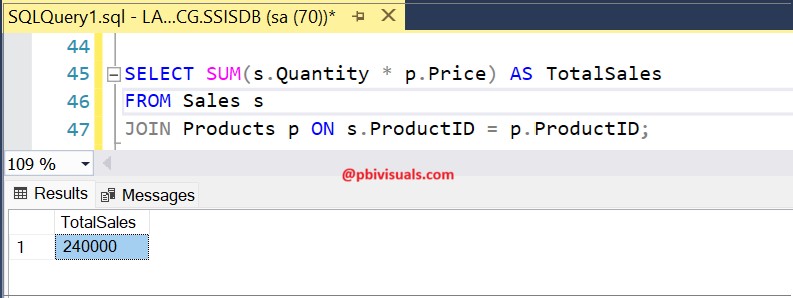
Q1. Find total sales amount
SELECT SUM(s.Quantity * p.Price) AS TotalSales
FROM Sales s
JOIN Products p ON s.ProductID = p.ProductID;
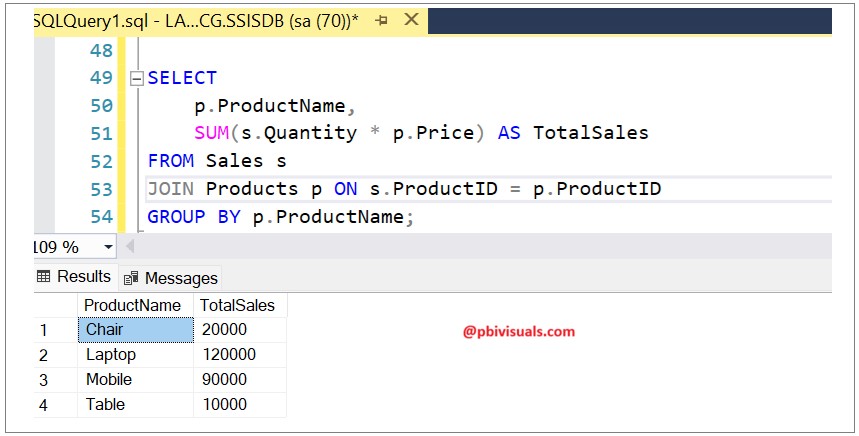
Q2. Find total sales by product
SELECT
p.ProductName,
SUM(s.Quantity * p.Price) AS TotalSales
FROM Sales s
JOIN Products p ON s.ProductID = p.ProductID
GROUP BY p.ProductName;
Q3. Find total sales by category
SELECT
p.Category,
SUM(s.Quantity * p.Price) AS TotalSales
FROM Sales s
JOIN Products p ON s.ProductID = p.ProductID
GROUP BY p.Category;

Q4. Find top 2 products by sales amount
SELECT TOP 2
p.ProductName,
SUM(s.Quantity * p.Price) AS TotalSales
FROM Sales s
JOIN Products p ON s.ProductID = p.ProductID
GROUP BY p.ProductName
ORDER BY TotalSales DESC;
Q5. Find customers who made more than one purchase
SELECT
c.CustomerName,
COUNT(s.SaleID) AS TotalOrders
FROM Customers c
JOIN Sales s ON c.CustomerID = s.CustomerID
GROUP BY c.CustomerName
HAVING COUNT(s.SaleID) > 1;
Q6. Find total sales by city
SELECT
c.City,
SUM(s.Quantity * p.Price) AS TotalSales
FROM Sales s
JOIN Customers c ON s.CustomerID = c.CustomerID
JOIN Products p ON s.ProductID = p.ProductID
GROUP BY c.City;
Q7. Find customers who purchased Electronics
SELECT DISTINCT
c.CustomerName
FROM Sales s
JOIN Customers c ON s.CustomerID = c.CustomerID
JOIN Products p ON s.ProductID = p.ProductID
WHERE p.Category = 'Electronics';
Q8. Find monthly sales
SELECT
MONTH(SaleDate) AS Month,
SUM(s.Quantity * p.Price) AS TotalSales
FROM Sales s
JOIN Products p ON s.ProductID = p.ProductID
GROUP BY MONTH(SaleDate)
ORDER BY Month;
Q9. Find average order value
SELECT
SUM(s.Quantity * p.Price) / COUNT(DISTINCT s.SaleID) AS AvgOrderValue
FROM Sales s
JOIN Products p ON s.ProductID = p.ProductID;
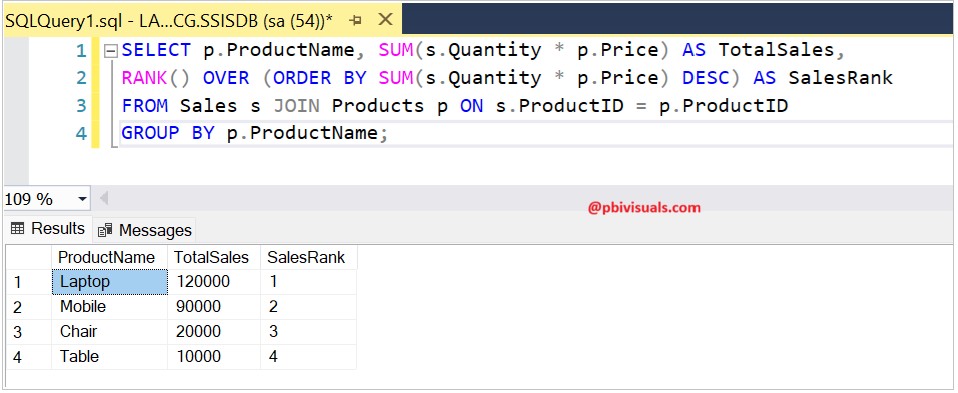
Q10. Rank products by sales
SELECT
p.ProductName,
SUM(s.Quantity * p.Price) AS TotalSales,
RANK() OVER (ORDER BY SUM(s.Quantity * p.Price) DESC) AS SalesRank
FROM Sales s
JOIN Products p ON s.ProductID = p.ProductID
GROUP BY p.ProductName;
Q11. Find customers with highest total spending
SELECT
c.CustomerName,
SUM(s.Quantity * p.Price) AS TotalSpent
FROM Sales s
JOIN Customers c ON s.CustomerID = c.CustomerID
JOIN Products p ON s.ProductID = p.ProductID
GROUP BY c.CustomerName
ORDER BY TotalSpent DESC;

Q12. Find products never sold
SELECT p.ProductName
FROM Products p
LEFT JOIN Sales s ON p.ProductID = s.ProductID
WHERE s.ProductID IS NULL;
This query will not return any records because every product has at least one sale.
